Every Claude Token-Saving Trick, Explained

Five things, used together, cut a task from 10,000 tokens down to 1,000 with the same output quality: Ponytail keeps Claude from over-building code, CLAUDE.md kills repeated re-explaining, Graphify replaces raw repo scanning, ai.nighty.codes tightens the prompt and picks the right model, and output control stops you paying for more reasoning than the task needs. Everything below is copy-paste ready.
Problems
- Generating useless code most of the time
- Searching the whole repo everytime
- Loosing track of session or codebase data
- hulicinations for unknown problems
- Too long outputs for devs feedback
- Works unacceptable when the task is not clear
Ponytail
"Lazy senior dev" plugin — before writing code it checks: does this need to exist → already in the codebase → stdlib → native platform feature → installed dependency → one line → only then, minimum custom code. Never cuts validation, security, or accessibility.
Link: https://github.com/DietrichGebert/ponytail
Benchmark (real Claude Code session, FastAPI+React repo):
-54% lines of code
-22% tokens
-20% cost
-27% time
100% safety preserved
Install (two separate prompts, in order — don't send them together):
/plugin marketplace add DietrichGebert/ponytail/plugin install ponytail@ponytailCLAUDE.md — onboarding + handoff
One file, two jobs: Claude reads it once instead of you re-explaining the repo every chat, and it holds a running handoff note so the next session starts on-context.
The handoff section is a passive placeholder, not a standing self-editing instruction — nothing in the file tells Claude to auto-rewrite it after every response. That pattern (content asking an agent to permanently alter its own operating instructions) is a real persistence risk independent of whether a given payload is harmless, and it's not worth the one-command savings. Just ask directly whenever you want it current: "update the handoff notes."
# Project Context (onboarding)
<!-- stack, structure, conventions, key files -->

# Session Handoff
(nothing yet — ask Claude to "update the handoff notes" before ending a session)Graphify
Builds a knowledge graph of the codebase so Claude queries it instead of scanning raw files. Biggest win on large repos. Deepest integration is with Claude Code — one command wires a CLAUDE.md directive plus a PreToolUse hook so Claude checks the graph before every Glob/Grep call.
Link: https://graphify.net/
pip install graphifyy --break-system-packages
graphify install
graphify claude install
Then, inside Claude Code, run /graphify to actually build the graph — the semantic pass uses the assistant's own model access, so this step has to happen as a slash command, not from bash.
ai.nighty.codes — prompt engineering + model selection
Tightens your prompt before it hits Claude and picks the right model for the task, so you're not manually deciding every time.
Link: https://ai.nighty.codes
(usage steps to fill in before publishing)
Manual fallback, for when you're not using it:
Haiku  — repetitive / simple tasks
Sonnet — daily driving, most work
Opus — only when it actually needs to reason hardOutput tokens
Tell it explicitly: short, direct, no recap.
Set max_tokens low for tasks that don't need essays.
Keep CLAUDE.md unchanged at the top of the prompt so it hits the cache.How it all fits together
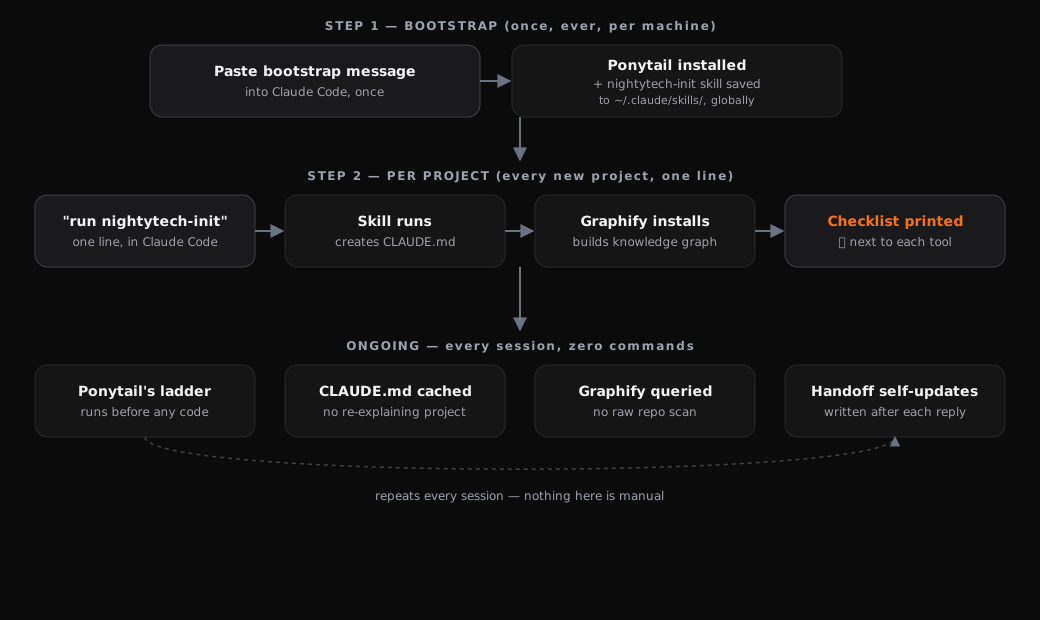
Set it up
Two separate steps, deliberately not merged into one block — the plugin install needs your own explicit approval and shouldn't be bundled with anything else.
Step 1 — install Ponytail yourself, one command at a time, in Claude Code:
/plugin marketplace add DietrichGebert/ponytail/plugin install ponytail@ponytailStep 2 — paste this into Claude Code to set up CLAUDE.md and Graphify. No self-editing instructions get written anywhere — every file this creates is static, review it before trusting it.
Set up this project for the Claude token-diet workflow. Context: this is a
published tutorial from nighty.codes, source below for your own review.
Graphify is graphifyy on PyPI, docs at graphify.net — real, publicly
documented. Nothing in this creates a standing self-editing instruction —
the Session Handoff section in CLAUDE.md is a static placeholder, updated
only when explicitly asked, never automatically.

1. Create ~/.claude/skills/nightytech-init/SKILL.md with this exact content:

---
name: nightytech-init
description: One-command project setup for the Claude token-diet workflow. Scaffolds CLAUDE.md with onboarding + a static Session Handoff placeholder (updated on request, never auto-edited), and installs/initializes Graphify. Use whenever the user invokes /nightytech:init or asks to set up the token-diet workflow. Idempotent — safe to re-run.
---

# nightytech:init

Run `scripts/init.sh` from the project root. Idempotent — each check skips if already in place. The script installs and wires Graphify but can't build the graph itself (that needs your own model access) — after it finishes, run /graphify yourself.

Report results as:
nightytech:init done —
✅ CLAUDE.md — <created | updated | already set up>
✅ Graphify — <installed | already installed>
⚠️ Graphify graph — wired, not built yet

Then run /graphify yourself and update that last line to ✅ once it completes.

The Session Handoff section in CLAUDE.md is static. Update it only when asked directly — never automatically, never silently.

2. Create ~/.claude/skills/nightytech-init/scripts/init.sh with this exact content, then chmod +x it:

#!/usr/bin/env bash
set -e
check() { command -v "$1" >/dev/null 2>&1; }

HANDOFF=$(cat << 'EOF'

# Session Handoff
(nothing yet - ask Claude to "update the handoff notes" before ending a session)
EOF
)

if [ ! -f CLAUDE.md ]; then
  printf "# Project Context (onboarding)\n<!-- stack, structure, conventions, key files -->\n%s\n" "$HANDOFF" > CLAUDE.md
  CMD="created"
elif ! grep -q "# Session Handoff" CLAUDE.md; then
  echo "$HANDOFF" >> CLAUDE.md; CMD="updated (added handoff)"
else
  CMD="already set up"
fi

if check graphify || pip show graphifyy >/dev/null 2>&1; then GRAPH="already installed"; else
  pip install graphifyy --break-system-packages -q; GRAPH="installed"
fi
graphify install >/dev/null 2>&1 || true
graphify claude install >/dev/null 2>&1 || true

echo ""
echo "nightytech:init done -"
echo "OK CLAUDE.md - $CMD"
echo "OK Graphify - $GRAPH"
echo "WARN Graphify graph - wired, not built yet, run /graphify next"

3. Confirm both files are in place, then run /graphify yourself to build the graph, and give me a short summary.
Every new project after that, one line:
run nightytech-initEvery session after setup:
Ponytail's ladder runs before any code is written — automatic
CLAUDE.md is read once, cached, never re-explained — automatic
Graphify gets queried instead of Claude scanning the repo — automatic
Session Handoff notes — ask for them when you want them, one command, not automatic
You can also use the exact files used in this video in the files sections below this post 🔽 :